I downloaded the unixutils from Sourceforge
http://sourceforge.net/projects/unxutils/
I got this following command from a very nice blog:
net stop wuauserv
REG DELETE "HKLM\SOFTWARE\Microsoft\Windows\CurrentVersion\WindowsUpdate\Auto Update" /v NextDetectionTime /fnet start wuauservwuauclt /detectnow
Then use the tail.exe -f command - to monitor the log file
Tail -f c:\windows\windowsupdate.log
Thursday, 3 September 2009


MSAccess 97 Out of memory Error Mesasge

Load 2 updates:
Office 97 service Release 1 (SR-1)
Office 97 Service Release 2 (SR-2)
Wednesday, 2 September 2009
Setting up Wamp Server and MediaWiki
Download Media wiki from http://www.mediawiki.org/wiki/Download
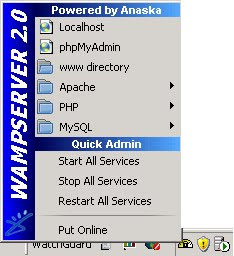 Please note that the Apache server needs to use port 80 and will not run if IIS is currently in use on the machine.
Download & Install WampServer 2 from http://www.wampserver.com/en/download.php
After the wamp installation click on the wamp icon in the tray
Please note that the Apache server needs to use port 80 and will not run if IIS is currently in use on the machine.Install Apache, Mysql services (you will have to stop the service then do the install)
Copy the extracted media wiki into a folder called mywikipedia and copy into c:\wamp\www
Open http://localhost/mywikipedia and click on the install

My wiki configuration
 Remember the mysql root pwd is by default blank.
To complete the installation, move config/LocalSettings.php to the parent directory. >> goto c:\wamp\www\mywikipedia\config\ and copy the localsettings.php to c:\wamp\www\mywikipedia\
Exchange 2007 - change DL-Group from non-universal to universal

Right click on the distribution group - select convert
I had to add a user that was on my Exchange server in Sydney to this group in LHR. So what I had to do was I added the user as a contact in Exchange "Contacts" and in the Active Directory "dsa.msc" as a contact - then added him to this distribution group.
A very good test before sending test message is to open an email - add the new distribution list to the email - open to see all members of the distribution group and check the very last added user to see whether you can see that users email address information.
A very good test before sending test message is to open an email - add the new distribution list to the email - open to see all members of the distribution group and check the very last added user to see whether you can see that users email address information.
Exchange 2007 Shell - Add user to distribution group
Add-DistributionGroupMember -Identity "Marketing Managers" -Member adam@contoso.com
Tuesday, 1 September 2009
WatchGuard (Firebox) Manager
Open WatchGuard System Manager
You can either right click and select the various components or you can click on the icons on the toolbar or you can click on Tools from the menu bar.
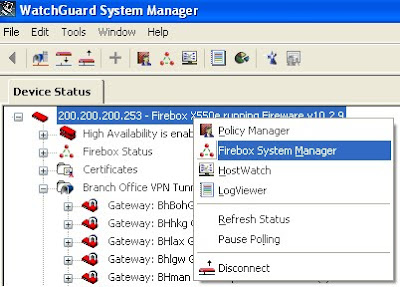
Below is a screenshot of the Watchguard System Manager:
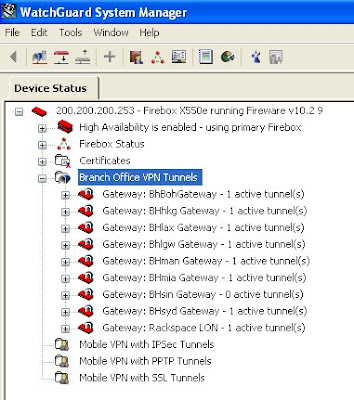
Click on Connect to Device: (the little red icon with a down arrow)
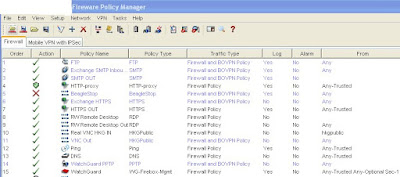
Policy manager click on the (triangle)
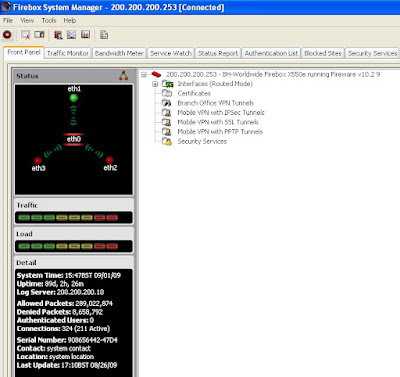
Host Watch
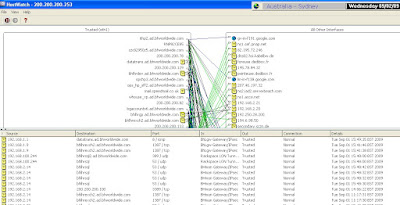
To view a specific host - double click on the host name on the left hand side
A quick view of the policy manager
A quick view of the policy manager
Sernum.vbs - Getting the serial number of a remote PC
Copy the following to a notepad file
ComputerName = InputBox("Machine Name To Query")
winmgmt1 = "winmgmts:{impersonationLevel=impersonate}!//"& ComputerName &""Set SerialN = GetObject( winmgmt1 ).InstancesOf ("Win32_BIOS")
For each Serial in SerialNMsgBox "Serial Number: " & Serial.SerialNumberNext
winmgmt1 = "winmgmts:{impersonationLevel=impersonate}!//"& ComputerName &""Set SerialN = GetObject( winmgmt1 ).InstancesOf ("Win32_BIOS")
For each Serial in SerialNMsgBox "Serial Number: " & Serial.SerialNumberNext
Safe as sernum.vbs - doubleclick to run - enter machine name and press ok/enter

Subscribe to:
Posts (Atom)